

Elevate design. Reveal insight. Streamline coordination.
One intelligent platform that brings smarter design management, deeper analytics, actionable insights, and seamless coordination together.

Move the duct 470 mm down: clears the clash, no new clashes in the building.
Thousands of clashes. A handful that matter.
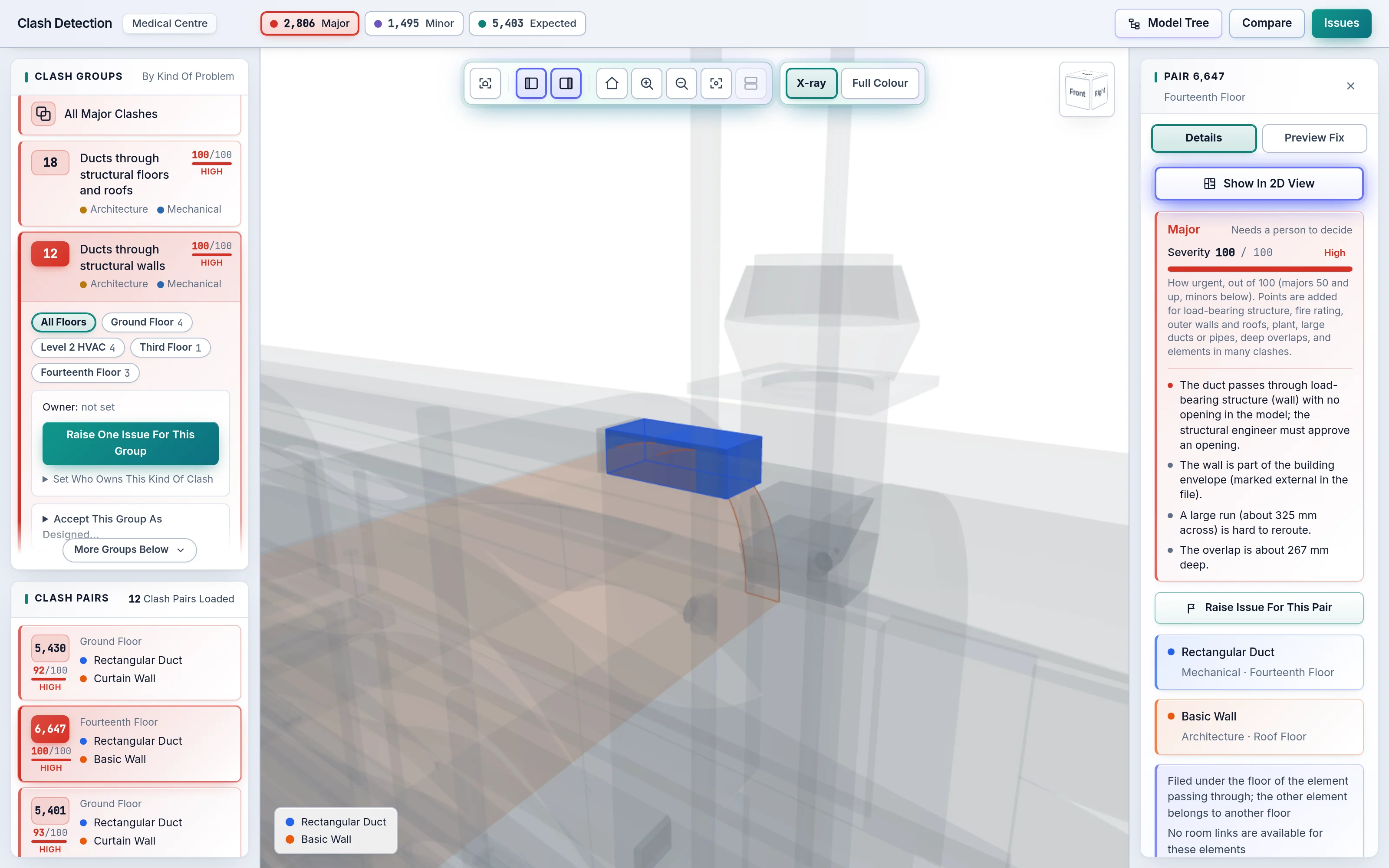
A federated model throws up thousands of clashes. Most are a socket in a wall or a pipe through its own sleeve; the few that matter get lost in the list. AI Clash Detection does the sorting, proposes the fix and routes the issue, so your team spends its time on decisions, not on scrolling.
Understand
Clashes are judged from the model itself: element types, disciplines, penetration depth, openings and host relations.
- Major, Minor or Expected, with the reason
- Grouped by root cause, not one row per pair
- Thresholds your experts can tune
Decide
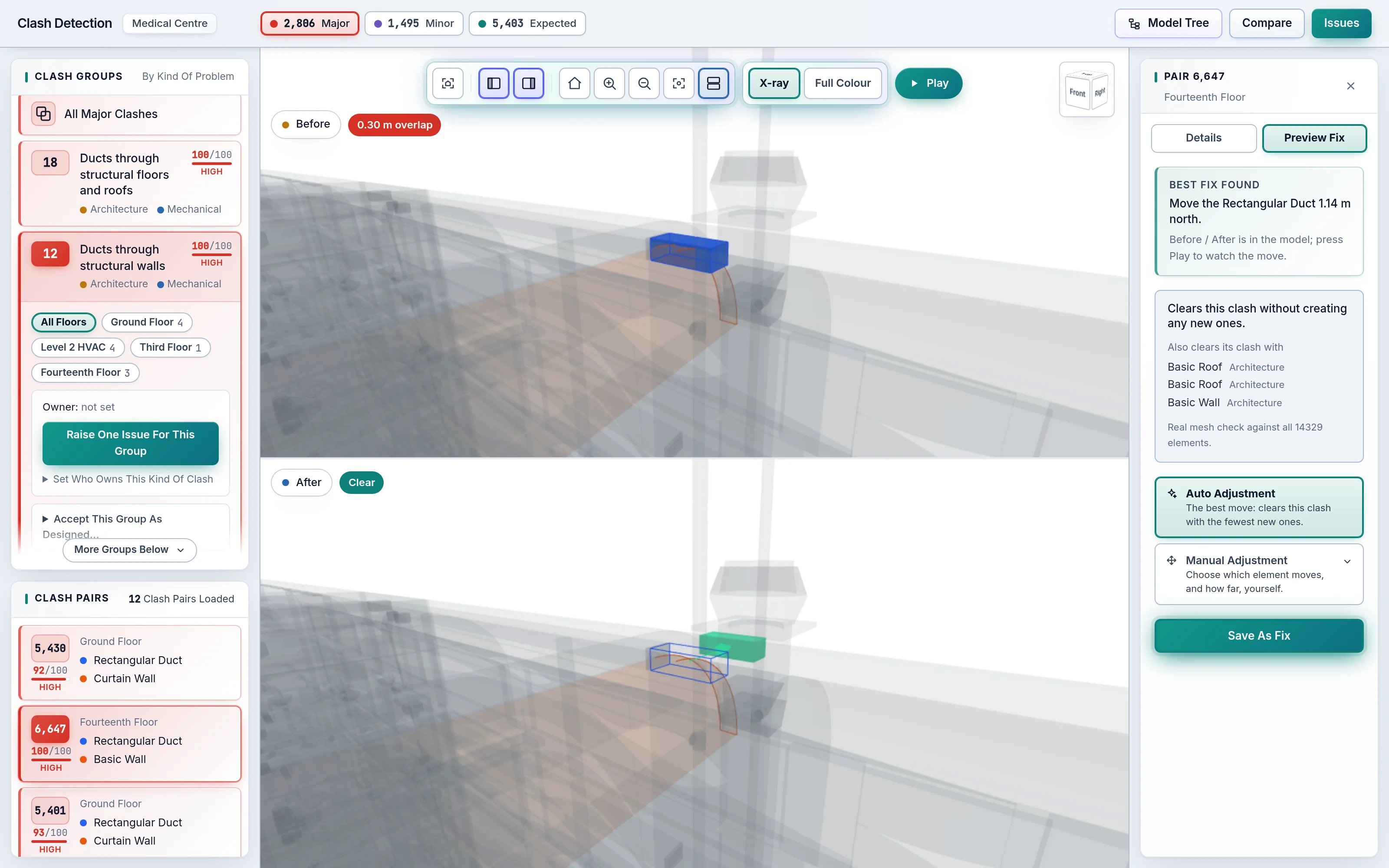
For any clash, AI Preview Fix finds the move that clears it while creating the fewest new ones.
- Checked against every element in the building
- Pre-Fix and Post-Fix views, played back
- Manual Adjustment when you know better
Assign
Rules raise the issues and AI assigns them to the right person. Owner, priority and status travel with every issue.
- Rule-Based Auto Issue Creation
- AI Auto-Assignment of BCF issues
- One live issue per clash, no duplicates
Nine features. One Design Intelligence Platform.
From Headless Clash Detection in the cloud to Virtual Reality design review, every tool your coordination needs, around one federated model.
Headless Clash Detection
Clash Detection runs in the cloud on every model drop. No desktop software, no model to open.
Open BIM Standards
IFC in, BCF out. Works with Revit, ArchiCAD, Tekla and every tool that speaks openBIM.
Multi-Disciplinary Coordination
Architecture, Structure, Mechanical, Electrical, Plumbing and Fire, checked together.
Clash Groups And Clash Pairs
Hundreds of Clash Pairs become a short list of Clash Groups, each with one root cause.
Rule-Based Issues With AI Assignment
Rules raise the issues; AI assigns each BCF issue to the right person.
AI Auto-Resolution
AI Preview Fix finds the move that clears a clash, then plays the Pre-Fix and Post-Fix views.
3D And 2D Views
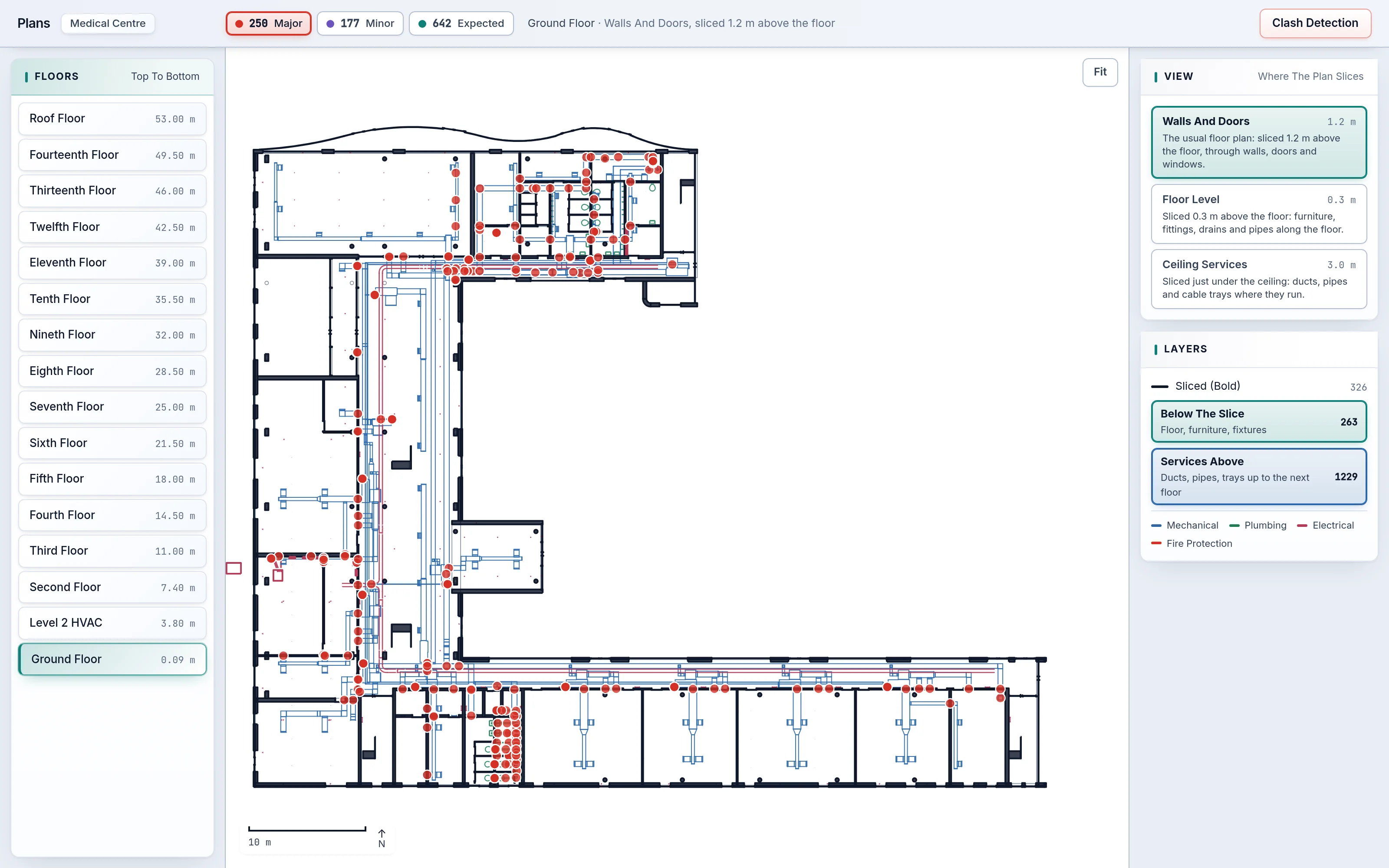
A fast 3D viewer and real 2D Floor Plans cut from the model, with clash markers on both.
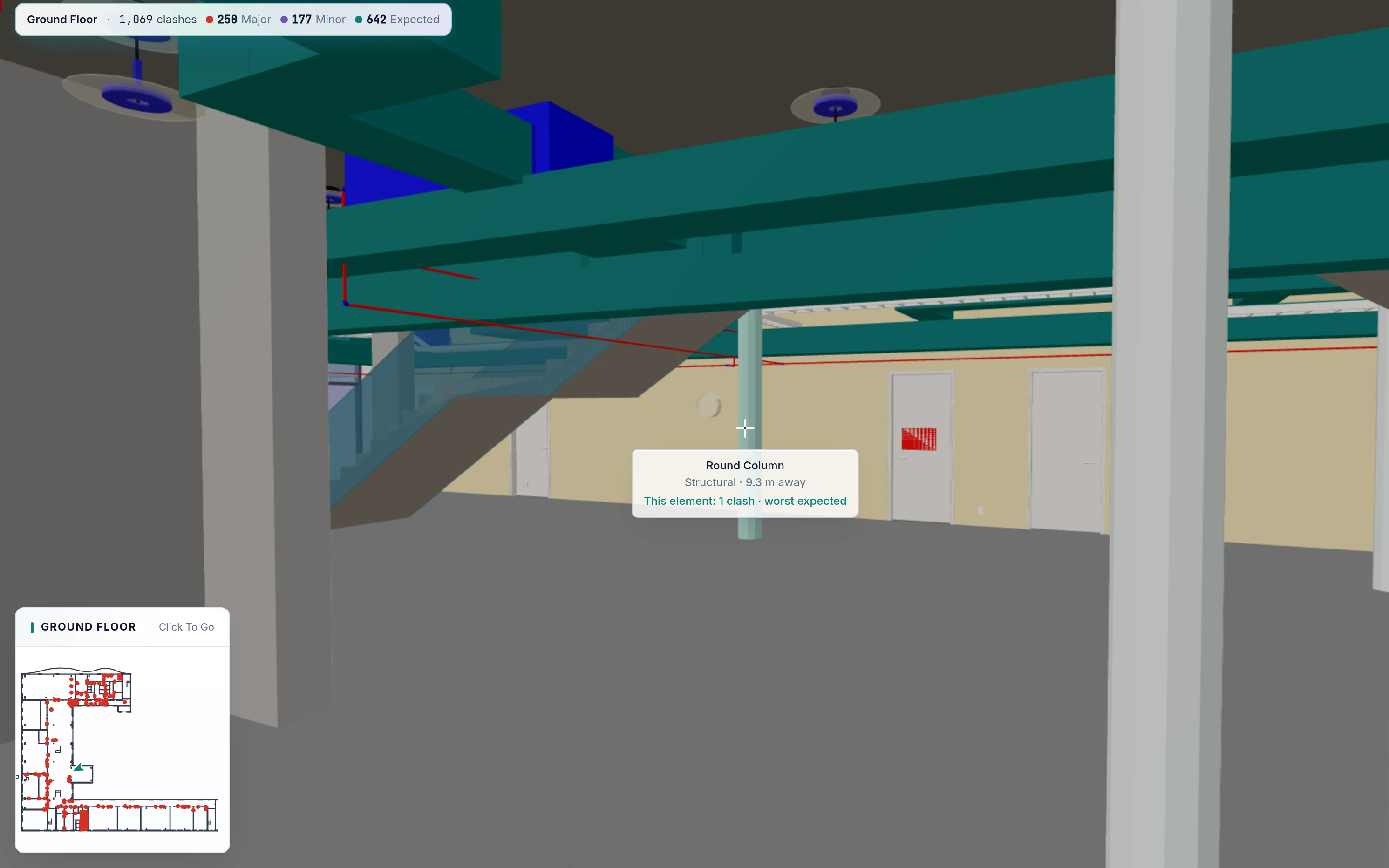
Easy Walk Mode And Virtual Reality
Walk the building at eye height, or put on a headset and stand inside it.
Object Parameters
Every element's IFC properties, a click away in the Model Tree.
One building, every view you need.
Clash lists, 3D, 2D Floor Plans, Walk Mode and Virtual Reality all show the same building, in the same colours.
Know which clashes matter, at a glance.
Every clash gets a class and a 0–100 severity. Clash Groups collect the Clash Pairs that share one cause, so “services through the Level 2 slab” is one decision, not forty rows.
- Hard clashes between and within discipline files
- Expected penetrations recognised from openings and hosts
- Compare any two runs: what is new, fixed or unchanged

A fix that has already been checked.
The smallest overlap is rarely the move that clears a clash, and a move that clears one clash can cause three more. AI Preview Fix tests candidate moves against the whole building and proposes the best one.
- Fewest new clashes, shortest move on a tie
- Pre-Fix and Post-Fix views, animated in 3D
- Save the fix with the issue for the designer

From the whole building to one bolt, and back.
Browse the Model Tree by floor, discipline, type and element; choose anything and only that is shown, with its Object Parameters a click away. 2D Floor Plans are real horizontal cuts through the model, with services above the ceiling on their own layer and clash markers on top.
- Floors sorted by elevation, counts on every node
- Plans at wall height, floor level and ceiling services
- Click a marker to open that clash in 3D

Walk the corridor before it is built.
Easy Walk Mode stays on the floor, climbs the stairs and goes through every door. The mini-map shows where you are on the plan; “Next Clash” takes you to the next problem. Put on a headset and Virtual Reality Mode puts you inside the same building at true scale.
- Aim at an element to see its name and clashes
- X-ray on a key press to see behind the ceiling
- Virtual Reality Mode for immersive design review

Your eye reads colour before words.
Each discipline and each clash class keeps one colour on every screen: list, 3D, plan, Walk Mode and VR. After a day you stop reading labels.
From IFC files to assigned issues, automatically.
Import
Drop the discipline IFC files and name the project.
Detect
Headless Clash Detection tests every element pair in the cloud.
Understand
AI classes, scores and groups clashes by cause.
Resolve
AI Auto-Resolution finds the fix, checked on the whole building.
Assign
Rules raise issues, AI assigns them; export as BCF.

Everything around the model, built in.
Workspaces
One per project, each with its own model versions, rules and team.
Model Versions
Import a new set, check it, then make it active; earlier runs stay comparable.
Site Map
The building in its real place, among its neighbours, with optional satellite imagery.
Roles
Admins, roles and permissions per workspace; people can start their own projects.
Open formats in, open formats out.
Bring IFC from the tools your designers already use. Take issues back to them as BCF. Nothing locks your project in.
IFC In
The open standard every major authoring tool exports. No plug-ins, no special preparation of the model.
BCF Out
Coordination issues leave in the open issue format, ready for the designer's own tools.
Access You Control
Roles and permissions per workspace decide who sees and who changes what.
A clash found in the model costs minutes. On site it costs weeks.
Every clash resolved before construction is a rework order, an RFI and a delay that never happen. AI Clash Detection makes that early check automatic, on every model drop.

See your own model in SpaceDesignX.
Send us an IFC set you know well. We will run AI Clash Detection on it live and walk you through what it finds, what matters and the fixes it proposes.